 FPL Pace

This guide covers what an FPL Live Activity shows, how to set one up in FPL Pace, and what to check if it fails to appear or stops updating. The troubleshooting checklist works for any FPL app that supports Live Activities.
Download FPL Pace on the App Store
What an FPL Live Activity shows, and where
A Live Activity can show up in up to three places depending on which iPhone model you use.
Lock Screen
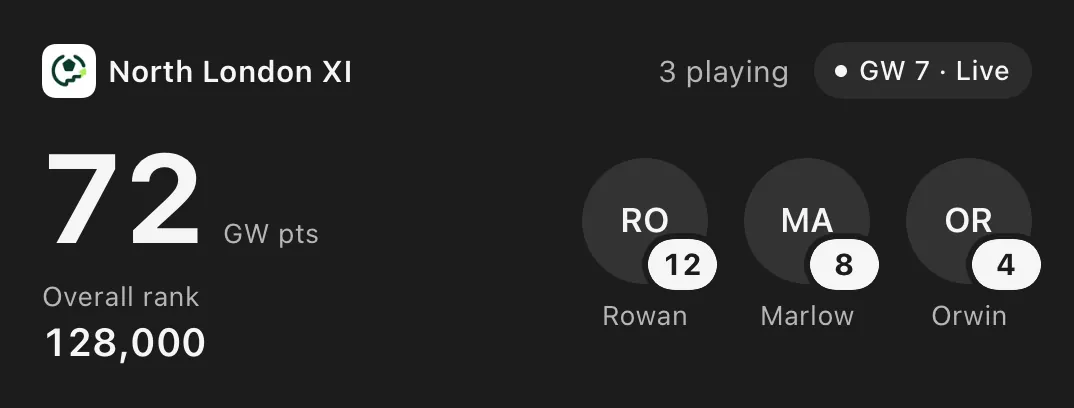
On the Lock Screen, the Live Activity sits below the clock as a dedicated card. This gives you the largest view. In FPL Pace, it tracks your squad's live points while fixtures are being played. Version 1.1.0 improved the player layout in the Live Activity.
Example data: these numbers are made up to show how it works, not from a real gameweek.
Dynamic Island (compact and expanded)
On iPhones with a Dynamic Island, the Live Activity also sits at the top of your screen while you use other apps. The compact view wraps a quick summary around the camera cutout. Touch and hold it to open the expanded view for more detail, or tap it to jump straight into the app.
Apple breaks down how these views work in its guide to Live Activities in the Dynamic Island.
iPhones without a Dynamic Island
Only certain iPhone models have a Dynamic Island. On other iPhones, the Live Activity appears on the Lock Screen only. Apple's Dynamic Island guide lists the supported models.
How to set up the Live Activity in FPL Pace
- Install FPL Pace from the App Store. The app requires iOS 17 or later.
- Enter your public FPL Team ID. The app does not ask for your FPL password.
- Allow notifications for FPL Pace when prompted.
- Confirm Live Activities are enabled for FPL Pace in your iPhone Settings. The next section shows where to find the toggle.
- On matchday, check your Lock Screen once the games kick off. If the Live Activity does not show up, run through the checklist below.
Turn Live Activities on in iPhone Settings
There are two settings to check. One belongs to the app itself, and the other controls what appears on your Lock Screen.
The app's own switch. On iOS 18 and later, including iOS 26 and iOS 27, go to Settings > Apps > FPL Pace, tap Live Activities and turn it on. On iOS 17, go to Settings > FPL Pace and turn on Live Activities. If you use another FPL app, select that app in the list instead.
Lock Screen access. Open Settings > Face ID & Passcode, or Touch ID & Passcode, and enter your passcode. Under Allow Access When Locked, check that the Lock Screen options you want are turned on. Apple covers these permissions in its guide to Lock Screen features.
Live Activity not showing or not updating? Checklist
Work through these steps in order. This checklist is not limited to FPL Pace, so you can use it for any FPL app with a Live Activity. The first four steps fix most issues.
- Are Live Activities allowed for the app? Check the app's dedicated Live Activities toggle in Settings, as shown above.
- Are notifications allowed? Open Settings > Notifications and check the app. Some apps need notifications on to show or update a Live Activity.
- Is Lock Screen access on? Check Allow Access When Locked in Face ID & Passcode settings. If a Lock Screen option is switched off there, it stays hidden whenever your iPhone is locked.
- Are matches live right now? An FPL Live Activity is built for live fixtures. Before kickoff or between matches, there may be nothing active to display.
- Was it swiped away? Swiping a Live Activity off your Lock Screen dismisses it. If you cleared it by accident, check the app or its support page to see how to restart it.
- Is Low Power Mode on? Low Power Mode restricts background activity, which can delay or pause live updates. Switch it off during matchday if you can.
- Is Background App Refresh on? Go to Settings > General > Background App Refresh and confirm it is enabled for the app.
- Is your connection working? Live updates need an active data connection. Poor signal or dropped Wi-Fi can leave the card stuck on old points.
- Has it been running for a long time? iOS caps how long a single Live Activity can run, at about eight hours. On a long matchday, it can end before the last match finishes.
- Does your iPhone have a Dynamic Island? If your model does not have one, look for the Live Activity on your Lock Screen instead.
- Is the data itself still updating? Scores come from official FPL match data. That feed can lag slightly behind the action on the pitch and get adjusted later.
- Still stuck? Update the app to the latest version on the App Store and restart your iPhone.
If the FPL Pace Live Activity still does not appear, visit FPL Pace support. Alerts and Live Activities rely on your device settings, permissions, network connection and available match data.
Live Activity, widget or notifications: what to use on match day
Each feature does a different job on matchday, and plenty of managers use all three together.
| Tool | Where it shows | Use it for |
|---|---|---|
| Live Activity | Lock Screen and Dynamic Island | Glancing at live squad points while matches are underway |
| Home Screen widget | Home Screen | A quick summary of your gameweek points or your H2H matchup |
| Notifications | Lock Screen and banners | Key moments, like your player scoring, your H2H rival's score moving or an upcoming deadline |
FPL Pace includes all three options. It offers a points widget and an H2H widget in small, medium and large sizes. It also sends player point notifications, H2H opponent score alerts and custom deadline reminders where you pick how many minutes before the deadline the alert lands.
If you compete in H2H leagues, check out the FPL H2H live guide to see how to read your matchup.
Why points on your Lock Screen can change
Live points are not final points. A Live Activity displays the latest feed available, and official FPL data shifts during and after matches.
- Bonus points are added live as matches are played and can still change after full time until FPL marks the gameweek final, so live totals can jump or drop.
- VAR decisions can disallow a goal or assist after it was initially awarded, taking those points back off.
- Data corrections from FPL can adjust stats and points after the match finishes.
So if your Lock Screen total drops, it is usually the data catching up, not the app losing points. In FPL Pace, points, bonus and rank can change as official data updates.
FPL Pace is an independent app and is not affiliated with the Premier League or Fantasy Premier League.
FAQ
Is there an FPL app that shows live points on the Lock Screen and Dynamic Island?
Yes. Several iPhone FPL apps use Apple's Live Activities to display live gameweek points on the Lock Screen and in the Dynamic Island while matches are underway, including FPL Pace, FPL Live and FPL Now. FPL Pace shows your live squad points there alongside Home Screen widgets, player point alerts and H2H opponent alerts. It connects using your public FPL Team ID and runs on iOS 17 or later.
How do I turn on Live Activities for an FPL app?
Open Settings, select the app and switch on Live Activities. On iOS 18 and later, you will find the app under Settings > Apps. You should also check the Allow Access When Locked options inside Face ID & Passcode settings.
Why is my FPL Live Activity not showing?
Check three things first: make sure Live Activities are enabled for the app, notifications are turned on, and the card was not swiped away. A Live Activity normally runs only while fixtures are live, and the Dynamic Island only appears on supported iPhone models while other iPhones show the card on the Lock Screen. Live points can also lag slightly or adjust as official FPL data updates.
Does it work without a Dynamic Island?
Yes. On iPhones without a Dynamic Island, the Live Activity sits right on your Lock Screen.
Should I use a Live Activity or a widget for FPL on match day?
Use a Live Activity to check live squad points on your Lock Screen while matches are in play. Use a Home Screen widget for an at-a-glance summary like your score or your H2H matchup. Use notifications for specific matchday moments, like one of your players scoring or your H2H rival's score shifting. FPL Pace supports all three.
Is the FPL Pace Live Activity free?
FPL Pace is free to download and includes an optional Pro subscription. Inside the app you can see which features belong to each plan along with current pricing.