 FPL Pace

This guide explains how to read a live H2H matchup, walks through an example from kickoff to the final match, and shows how to track it in FPL Pace without opening a browser.
Download FPL Pace on the App Store
Example data: these numbers are made up to show how it works, not from a real gameweek.
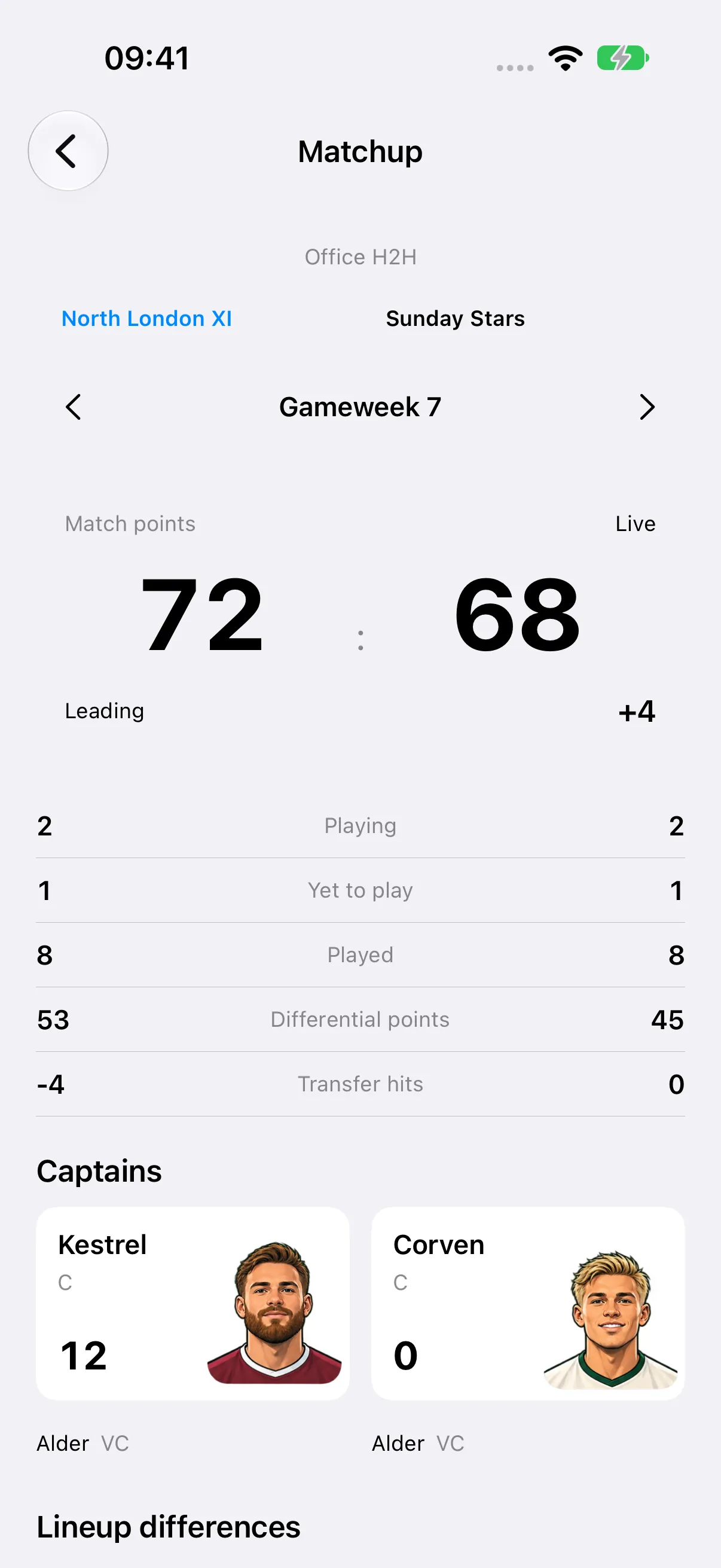
How an FPL head-to-head matchup is decided
In an H2H league, you face one other manager each gameweek. The manager with the higher gameweek score wins, after deducting points for extra transfers. A win earns 3 league points, a draw earns 1 and a loss gets 0. Those results build your league table. The official FPL rules cover tie-breaks and the finer details.
In H2H, your overall gameweek score matters less than the gap between you and your opponent.
Who's left to play: reading the rest of your gameweek
Across a gameweek, every player in your matchup sits in one of three states:
- Finished: their points for the gameweek are locked in, aside from late bonus or adjustments.
- Playing: their match is live and their points can still move.
- Still to play: their match has not kicked off yet.
To work out "can I still win my FPL H2H this gameweek?", count the differentials still to play on both sides. Shared players left to play will not shift the gap. A captain left to play counts double.
- If you trail but have more differentials left to play, you still have room to catch up.
- If only your opponent has differentials left, you cannot add to your side. You only gain ground if their players lose points, for example through cards or own goals, or through late bonus changes and autosubs.
- If neither squad has differentials left, the matchup is nearly settled, though bonus points and data adjustments can still nudge the final score.
This is a way to read the matchup, not a prediction.
Worked example: one H2H matchup, start to finish
Example data: these numbers are made up to show how it works, not from a real gameweek.
Here is how one matchup plays out across three stages of a gameweek. The players and numbers are an example to show how the maths works.
You and your opponent share eight starters. You captain a shared player, S. Your opponent owns S but captains their own differential, R1. You took a -4 hit while your opponent took no hits.
- Your differentials: A, B and C
- Your opponent's differentials: R1 (captain), R2 and R3
1. Before kickoff
You sit on -4 and your opponent sits on 0, putting you 4 points down before the first kickoff. Your captain S is shared, though only you gave S the armband. That means S's points count once in your favour. Your rival's captain R1 is a full differential, so every point R1 scores counts twice against you.
2. Halfway, Saturday evening
The remaining shared starters rack up 20 points on each side and cancel out completely. S scores 6, giving you 12 as captain and your opponent 6. Your differential A finishes on 2, while R2 also finishes on 2.
The scoreboard reads 30 to 28, putting you ahead by 2. Now look at who is left to play. You have B and C still to come. Your rival has R1 left, wearing the armband. A 2-point lead is fragile when you are staring down an opposition captain.
3. Before the last match
On Sunday, B scores 8 and R3 scores 1. The score moves to 38 to 29, stretching your lead to 9. Only one fixture remains, featuring C for you and captain R1 for your rival.
R1's points count double. If R1 scores 5 or more, that is at least 10 for your opponent, enough to pass you unless C scores too. This is where reading the matchup breakdown matters far more than glancing at the raw scoreline.
In the final game, R1 hauls 9, doubled to 18. C finishes on 2. The matchup ends 40 to 47, handing your opponent a 7-point win.
| Player | Owned by | Points | Effect on the gap |
|---|---|---|---|
| S, your captain | Both | 6, doubled for you | +6 for you |
| A | You | 2 | +2 for you |
| B | You | 8 | +8 for you |
| C | You | 2 | +2 for you |
| R1, opponent's captain | Opponent | 9, doubled | +18 for opponent |
| R2 | Opponent | 2 | +2 for opponent |
| R3 | Opponent | 1 | +1 for opponent |
| Transfer hit | You | -4 | +4 for opponent |
| Other shared players | Both | 20 each | 0 |
Total those swings up and you get +18 on your side against +25 for your rival, creating the 7-point defeat. The other shared starters scored 20 points each and changed nothing. The entire H2H came down to one captain swing and a 4-point hit.
How to follow your H2H live in FPL Pace
- Install FPL Pace from the App Store.
- Enter your public FPL Team ID.
- Open your H2H league.
- Tap your matchup card. Since version 1.1.0, tapping the card opens the full matchup breakdown directly.
- Check the breakdown: shared players, differentials, captain multipliers, transfer hits and who is playing, finished or still to play. You can also collapse team groups to keep the screen compact.
Get alerts when your opponent's score moves
Switch on player point notifications to get pinged when your own squad scores. Add H2H opponent score alerts to know when your rival's score shifts. Together, they keep you across both sides of the gap.
Keep the matchup on your Home Screen
FPL Pace includes an H2H widget alongside a points widget for your Home Screen. The H2H widget comes in small, medium and large sizes so you can check the gap without opening the app.
Follow your points from the Lock Screen
FPL Pace can also display your squad points on the Lock Screen and in the Dynamic Island. Check the FPL Live Activity guide for setup details.
Web H2H trackers vs an iPhone app
Browser trackers like fplmania, FPL Rivals, FPL Arena and Live FPL Tables are great on a desktop. They work well for digging into season history, chip usage, live league tables and BPS breakdowns.
An iPhone app suits match day. Alerts reach you when the score moves, and widgets and the Lock Screen let you glance without opening a browser. Many players use both: a web tool for planning and an app during the matches.
Privacy: why a Team ID is enough
FPL Pace only needs your public FPL Team ID. It does not ask for your FPL password. It cannot make transfers and does not change your official lineup.
Your Team ID points to your public FPL profile. Anyone who has the ID can already see the same squad and league data on the FPL site. FPL Pace reads that public data.
FPL Pace is an independent app and is not affiliated with the Premier League or Fantasy Premier League. Live points, bonus and ranks can adjust as official match data updates. If you need a hand, visit FPL Pace support.
FAQ
How can I compare my FPL team with my H2H opponent live?
Enter your public FPL Team ID into a head-to-head tracker, open your H2H league and pick the current gameweek matchup. In FPL Pace on iPhone, the matchup view lines up both starting XIs side by side to separate shared players, differentials, captain multipliers and transfer hits, while showing who is playing, finished or still to play. Live points can adjust as official FPL data updates, including bonus points.
What decides an FPL head-to-head matchup?
An FPL H2H fixture goes to the manager with the higher gameweek score after taking off points for transfer hits, awarding 3 league points for a win, 1 for a draw and 0 for a loss. Shared starters score the same for both sides and cancel out, meaning the gap is decided by differentials, captain multipliers and transfer hits.
How do captains and transfer hits affect an H2H score?
Your captain's score is doubled. If both managers captain the same player, those points cancel out. If you pick different captains, each captain's extra points swing the matchup. Every transfer hit deducts 4 points straight from your gameweek score, counting directly against you in H2H.
Can I still win my FPL H2H this gameweek?
Check the differentials still left to play on both teams, as well as whether either captain is yet to play. If you are chasing but have more differentials left to play, you can still make up the deficit. If only your rival has differentials left, you can only gain ground if their players lose points or late bonus and autosubs go your way.
Can I get notified when my opponent scores?
Yes, in FPL Pace. Switch on H2H opponent score alerts to get a notification when your rival's score moves, alongside player point notifications for your own squad.
Do I need my FPL password to track my H2H rival?
No. Head-to-head trackers like FPL Pace only use your public FPL Team ID, which pulls the same squad and league details visible to anyone on the official FPL site. FPL Pace does not ask for your password, cannot make transfers and does not change your official lineup.
Is there an FPL H2H app for iPhone with widgets?
Yes. FPL Pace offers an H2H widget in small, medium and large sizes, along with a points widget.
Is FPL Pace free?
FPL Pace is free to download and offers an optional Pro subscription. Inside the app you can see which features come with each plan and check current pricing.
Does it work on iPad?
Yes. FPL Pace runs on iPhone with iOS 17 or later and on iPad with iPadOS 17 or later.